Showing posts with label mac. Show all posts

MacBook Pro Retina 15" screen coating is coming off; Apple refuses to fix

No comments:

Summary: my very expensive mac laptop's screen coating started to come off in under a year, and Apple refuses to repair it under warranty.

EDIT: The fact is that this is a known problem and other people have got it covered under warranty. So why not me?

EDIT: This is very well-known problem at this point (3/18/2015) there is the "staingate.com" database, and a lively hacker news discussion about it. There is also a petition, and a facebook group. 

Early last year I bought a top-of-the-line MacBook Pro Retina 15”. It cost about $3500. (I am a professional programmer, and use ever last ounce of this capacity.)

A few months ago, I noticed that the screen coating was starting to come off around the edges. About a week ago, I noticed a spot of missing coating in the middle of the display. 

 Top Bezel Screen Coating Wear

The biggest spot is along the top bezel, which doesn't affect the display.

Center Screen Coating Spot

Notice the spot in the middle of the display. The light spots aren't oil or dirt, it's the screen coating came off.
When the screen is dark (as it is in my preferred Sublime Text mode) it is highly visible, and it’s annoying. “No problem,” I thought, “it’s under warranty and I’ll just bring it into the Apple Store, and they'll make it right." So I made an appointment and went in just this morning (2/5/15).

My appointment was for 11:30am. I got there at 11:25am. I was not seen until 12:10pm.

He asked me a few questions, and seemed particularly interested in whether or not I'd ever used alcohol to clean the display (I hadn't). He took my info, went in the back for about 5 minutes, and came back out and said, "Screen wear is not covered under the AppleCare warranty. You have two options: we can repair it 'in depot' for $288, or we can do it here for $600."

I couldn't believe it! Here it was, plain as day, defective screen coating was coming off within a year, and he was telling me it wasn't covered - with the strong implication that I was somehow to blame. 

This was not damage caused by me, but rather insufficiently strong screen coating that wears quickly, and it is wrong to ask me to pay $300 to fix it. Apple can and should fix it on their dime - and apologize for wasting my time. It's not like Apple is hurting and can't afford to do the right thing: Apple Computer has 40% profitability, $75B in cash reserves (more than the US Government) and here they are nickel-and-diming the people who are critical to their success. That seems like a bad idea to me.


Creating an iPhone Ringtone from a Youtube Video

No comments:
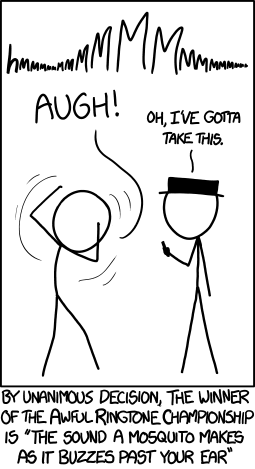
XKCD makes an excellent point:


The question becomes: how do I get a ringtone like this? First, find a good source. YouTube has a good source for mosquito sounds, although SoundCloud might be a better option, YouTube has a much wider selection.

Now the question becomes: how to get that sound on my phone as a ringtone. There are many ways to do it. The cleanest way is to install an audio router, such as sunflower (for OSX). However, this isn't something I'll want to do all the time, and the sound quality doesn't really matter that much to me, so I decided to do the simple thing and record computer speaker output with the Voice Memo app on the iPhone. Here's how it worked:

  1. Record the audio with your iPhone Voice Memo app.
  2. Sync to iTunes
  3. Use GarageBand (which is system software) to import the audio file, set the loop, and modify. Instructions on how to do this are available inside GarageBand help - Select Help from the menu and then search for "ringtone".
  4. In iTunes, select your iPhone and then select "Tones" from the psuedo-tabs. If you're like me, you never click on this and it's easy to miss.
  5. Click the "Sync Tones" box.
  6. Select your tone.
  7. Hit the "Apply" Button
  8. In your iPhone, go to Settings|Sounds and select your ringtone!
  9. Profit!
Personally, I think it would be stellar for Apple to add the ability to add a "Use Voice Memo as a ringtone" function right on the phone, without having to go through all of these steps. You could put it in the "Share" menu. Are you listening, Apple? :)

How to solve "cannot connect" problem with VMWare Fusion after Migration Assistant

4 comments:
'The problem:
I recently used the Migration Assistant to move my applications and data over to
the a new machine from my old MacBook.

Everything works fine, except for VMWare Fusion. When I attempt to start either
my Windows XP or Ubuntu images, VMWare complains, "vmware fusion cannot
connect to the virtual machine. Make sure you have access rights..." and
so on.

I did a search through your knowledge base for both the error message
and "migration assistant". No luck. I did a Google search too, and there
are many people with this same problem. The resolution that apparently
works is to reinstall VMWare. But I figure I'd check with you first.

Here's the answer from tech support (which was rather prompt!):
You may need to reinstall Fusion but hopefully not just yet.
Try these steps first to repair the permissions of the virtual machine filles:

1. Log in as a user with administrative rights.
2. Navigate to Documents->Virtual Machines (or wherever you saved your VM files)
3. Right-click the .vmwarevm file that corresponds to the name of the virtual machine you want to work with and choose "Get Info".
4. Unlock the padlock at the bottom of the window using your administrator password.
5. From "File & Extension" remove the .vmwarevm extension.
6. Close the "Get Info" window. This file now displays as a folder.
7. Right-click the folder and choose "Get Info"
8. Under "Sharing & Permissions" beside your user name and "Everyone" ensure the Privilege is set to "Read & Write".
9. Click the gear next to + - at the bottom of the window and choose "Apply to enclosed items".
10. From "File & Extension" re-add the .vmwarevm extension to the end of the file name.
11. Close the "Get Info" dialog.
12. Restart your Mac.
13. Launch VMware Fusion and run the virtual machine.

If your issue has been resolved by this email please let me know.

If you have any questions please feel free to contact me by responding to this email.

Regards,

Kellan Adamson
Desktop Technical Support Specialist
Global Support Services
VMware Inc.
Here's my answer, based on the above:
  1. Start Terminal
  2. cd Doc[tab]/Virt[tab] (should yield something like cd Documents/Virtual\ Machines.localized/)
  3. chmod -R o+rw *.vmwarevm

It works!

Dashcode for iPhone web development

No comments:
Interestingly Apple is applying the Dashcode IDE to iPhone web development. Although Dashcode was designed for makeing Dashboard widgets, this makes a lot of sense - I've written before how similar mobile and widget development is.

The nice thing about Dashcode is that you can get a working prototype going quickly. And it has lots of juicy iPhonish assets right out of the box - saving considerable Photoshop time.

The naughty thing about Dashcode is that it's just not a very good IDE, and the code it generates is rather awful, especially for mobile deployment. I mean, if you want to write a mobile app that degrades to a non-Javascript version, you are essentially out of luck. Additionally, the pages it creates are really heavy, and feature lots of inline JavaScript (which can't be cached.)

Granted, I just discovered Dashcode yesterday, but so far it looks like I'll just be pulling assets out of it and using my old stand by tools.

(Sorry about the lack of hyperlinks - feeling a bit lazy. Use Google!)

More MacBook goodies

No comments:
I'm not too thrilled with the Dock. But to make up for it, at least I have Quicksilver and Fink. Roughly, these are (significantly better) versions of Google Desktop and Cygwin, respectively.

What continues to astound me is the dearth of window management options on the Mac - everyone seems to think that the only problem with the Dock is it's launching functionality!

The MacBook Keyboard

2 comments:
There are, alas, some keys missing from this keyboard. There is only one delete key, but no backspace. There are no page up page down keys. There is no home or end key (very handy in a text editor). It's funny how you aren't aware of the shortcuts you use until you lose them, such as CTRL+Arrow (move word), or even CTRL+Backspace (delete word) - yes, you can do these with the Option key, but it's funny how off putting the change is. I'm used to doing sequences like "CTRL+X CTRL+V CTRL+Left Arrow".

Home and End are actually very handy ways to get to the beggining and end of a text field - or a document. They are also missing. Sigh. Hopefully I will find a keyboard remapper and map some of the function keys to these badly needed additions. And in the meantime, there is a guide that tells you what shortcuts exist.

Help port Java 6 to the Mac!

No comments:
Danial Spiewak gushes about the Landon Fuller's attempt to do an open source, 3rd-party port of Java 6 to the Mac. Got a Mac and an itch to code? You might want to help out.